


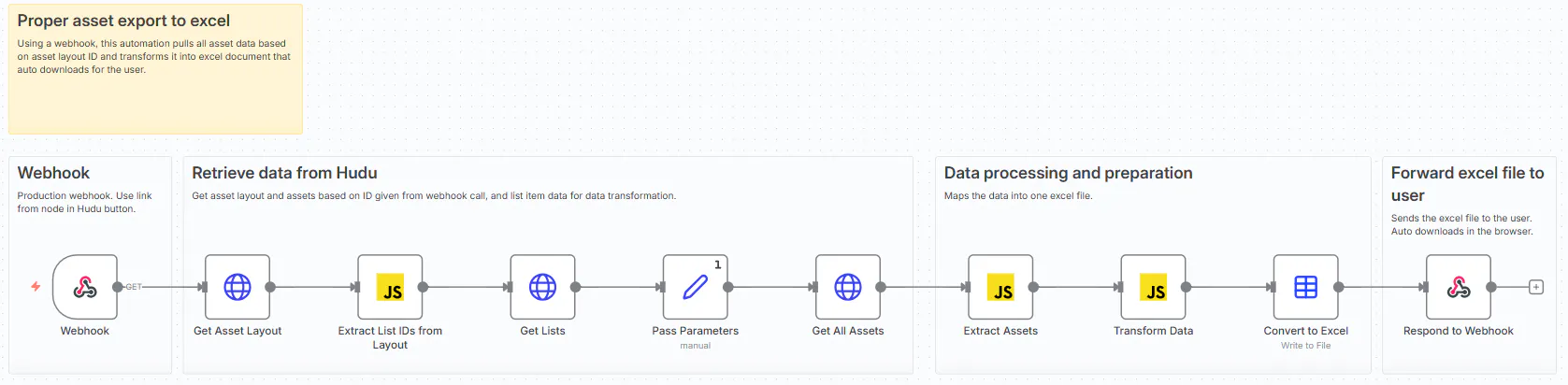
n8n Automated webhook that retrieves all data of an asset type based on asset layout ID.
Exports in excel file with list item names instead of ID, as you would expect an export to do.
Maps [list id] to the actual name, useful for further data processing in excel.
Works dynamically with all forms of asset layouts.
To make it work, enter your Hudu api key in all HTTP nodes. Create an asset layout, for example call it "Export". Add "</> Embed" field. When creating the asset enter the webhook link from n8n.
The n8n automation must be "active" and the webhook URL must be production instead of test.
To make things more user friendly in Hudu, I made the embedded webhook button more pretty:
<div style="padding: 20px; background: linear-gradient(135deg, #667eea 0%, #764ba2 100%); border-radius: 10px; box-shadow: 0 4px 6px rgba(0,0,0,0.1); margin-bottom: 30px;">
<h2 style="margin-top: 0; color: white; font-size: 24px;">💻 Export Computer</h2>
<p style="color: white; margin-bottom: 20px;">Download all computer assets with readable data</p>
<a href="<Your webhook production link>?layout_id=1&company_id=1" style="display: inline-block; padding: 15px 30px; background: white; color: #667eea; text-decoration: none; border-radius: 8px; font-weight: bold; box-shadow: 0 2px 4px rgba(0,0,0,0.2);">📥 Export Now</a>
<p style="color: white; font-size: 12px; margin-top: 20px; margin-bottom: 0;">ℹ️ Excel file will download automatically</p>
</div>